
mcp
com.americancloud/mcp
Manage American Cloud VMs, Kubernetes, databases, storage, networks and DNS from your AI assistant.
Documentation
American Cloud MCP Server
Manage American Cloud infrastructure from Claude, ChatGPT, Grok, Cursor, Codex, and any other MCP client: 179 tools across compute, storage, networking, Kubernetes, databases, WordPress, and DNS.
There are two ways to connect:
| Hosted server | Local server (this package) | |
|---|---|---|
| Address | https://mcp.americancloud.com/mcp | npx @americancloud/mcp |
| Sign in | Your American Cloud account, through the client's connector or MCP settings. No install, no token. | An API token in the client configuration. Runs on your machine over stdio. |
| Permissions | Set per app in Connected apps in the dashboard: Read-only, Full access, or Custom. Change them at any time; the app picks up the change on its next request. | The token's preset, plus the --allow-writes flag. |
| Best for | Claude on the web, Claude Desktop, Claude Code, ChatGPT, Grok, Cursor, Codex | Windsurf, VS Code, other stdio clients, scripts and CI |
The hosted server needs no setup beyond a sign-in: follow the guide for your client under Guides. The rest of this README covers the local server.

Quick start
Add to your MCP client configuration (Claude Desktop, Claude Code, Cursor, …):
{
  "mcpServers": {
    "americancloud": {
      "command": "npx",
      "args": ["-y", "@americancloud/mcp"],
      "env": {
        "AMERICANCLOUD_API_TOKEN": "amcld_…"
      }
    }
  }
}
Create and manage API tokens at
console.americancloud.com/api-tokens.
A token has the same presets as a connected app: Read-only, Full
access, or Custom. A legacy API key (client ID and secret) still works:
set AMERICANCLOUD_API_CLIENT_ID and AMERICANCLOUD_API_CLIENT_SECRET instead
of the token.
The server is read-only by default — see Safety before enabling resource management.
Service groups
By default the core infrastructure groups are enabled: compute, storage,
networking, kubernetes. Scope or extend with --services:
npx @americancloud/mcp --services all
npx @americancloud/mcp --services compute,dns
| Group | Tools | Covers |
|---|---|---|
compute (default) | 25 | VMs, packages, images, regions, SSH keys |
storage (default) | 27 | block storage, snapshots, object storage and its access keys |
networking (default) | 57 | isolated/VPC networks, VPC tiers, public IPs, firewall, port forwarding, load balancers, egress, ACLs |
kubernetes (default) | 11 | managed Kubernetes clusters |
databases | 36 | managed MySQL/PostgreSQL/Redis, backups, infrastructure, offerings |
wordpress | 16 | managed WordPress |
dns | 7 | hosted DNS zones and records |
Scoping with --services keeps the tool list small for context-sensitive
clients.
Safety
This server lets an AI assistant manage real infrastructure with real billing. It's designed to be safe by default:
- Read-only by default. Out of the box, only read tools (list/get/cost
estimates) are registered — an assistant can explore and inspect but cannot
create, modify, or delete anything. To enable management tools, add
"--allow-writes"toargs. - Secrets need
--allow-writestoo. Five read tools return a secret:get_kubernetes_cluster_config(the kubeconfig),get_object_storage_keysandlist_object_storage_access_keys(S3 keys),get_database_connection(the password, withincludePassword) andget_database_backup_repo(S3 keys, withinclude_credentials). They don't change anything, but the API requires the manage permission for them, so the read-only default doesn't register them. They appear with--allow-writes. - Use the narrowest token. For inspection, create a token with the
Read-only preset — then resource mutation and secret reads are
impossible regardless of any flag, because the token itself can't perform
them. Only use a token with Full access together with
--allow-writeswhen you actually want the assistant to make changes or read a secret. - Changes are flagged. Every write tool that changes or removes something that already exists (update, replace, stop, detach, resize, delete, and so on) is marked destructive, so MCP clients that support confirmations will prompt before running it. Only tools that add something new are not. Tools that cause irreversible loss (delete, release, reinstall, revert, cancel) also start their description with ⚠️ DESTRUCTIVE.
- No automatic retries. The server sends each API request once. If a create call fails with a server error, check with the matching list or get tool before you try again, so you do not create the resource twice.
// management-enabled (Full access token + opt-in flag):
"args": ["-y", "@americancloud/mcp", "--allow-writes"]
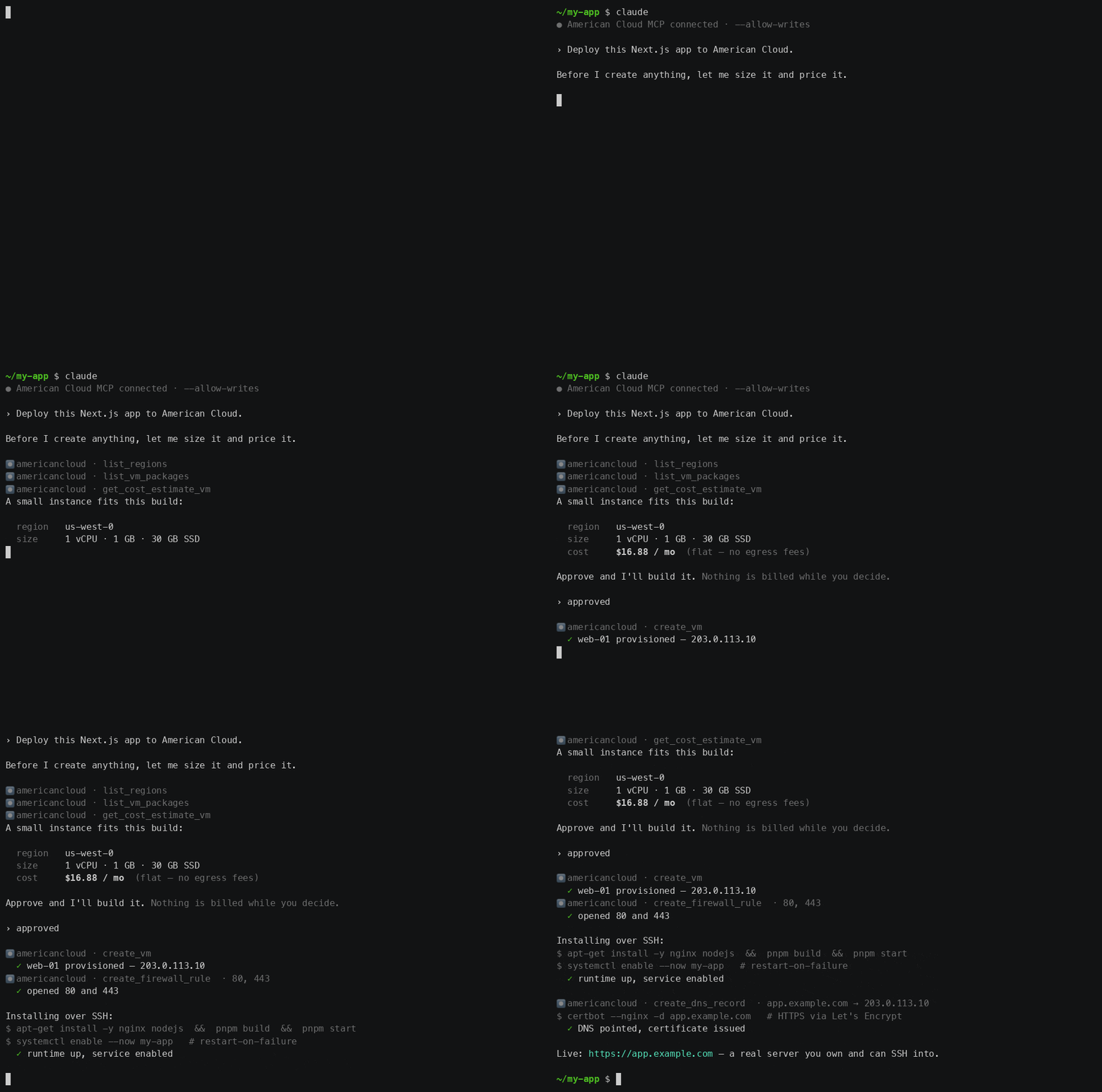
With writes enabled, the assistant can provision and deploy — and it still shows you the cost and waits for approval before creating anything:
Inside a VM
The tools manage your account: they create, change, power, resize and delete resources. No tool runs a command inside a VM, and the server stores no key or password for your machines. In-VM work takes one of these paths:
- A client with a shell (Claude Code, Codex, Cursor) gets the public IP
from
get_vmand runsssh cloud@<public-ip>itself, with your own key. Before the first VM it registers the host's own public key withcreate_ssh_keyand passes it tocreate_vm, so it logs in with the key it already has. - A new VM can configure itself on first boot with a cloud-init script in
create_vm'suserdataargument. - A running VM without SSH gets a browser console from
create_vm_console, for you to use.
A chat client without a shell (Claude.ai, ChatGPT, Grok) can do the second and third, not the first. The server tells the assistant this in its instructions, so it says so instead of guessing.
Environment
| Variable | Required | Purpose |
|---|---|---|
AMERICANCLOUD_API_TOKEN | one credential | API token (Authorization: Bearer amcld_…). Create one at console.americancloud.com/api-tokens. |
AMERICANCLOUD_API_CLIENT_ID | legacy | Legacy API key: client ID (X-API-Client-ID). Use with the secret, instead of the token. |
AMERICANCLOUD_API_CLIENT_SECRET | legacy | Legacy API key: client secret (X-API-Client-Secret) |
AMERICANCLOUD_API_URL | no | API base URL override |
Guides
Full documentation on the American Cloud docs site:
- MCP server overview — hosted and local servers, permissions, safety, and service groups
- Client setup, hosted and local: Claude Code · Claude.ai and Claude Desktop · ChatGPT · Grok · Cursor · Codex · other clients
- Things to try — prompt ideas across compute, storage, networking, and DNS
- Deploy with AI — migration playbooks and deployment recipes built on this server
Versioning
See VERSIONING.md — the server versions independently;
the exact-pinned @americancloud/sdk dependency states the API surface it
targets.
Contributing
This server is generated and maintained in lockstep with the American Cloud
SDK and API — see CONTRIBUTING.md for how to report
issues or propose changes.
License
@americancloud/mcpnpm install @americancloud/mcp