
cartograph
io.github.pbathuri/cartograph
Your agents search your PDFs, docs and code locally and cite the page. Shared memory across clients.
Documentation

Your AI agents can read your papers, docs and code, and cite the page.
Cartograph turns your folders (PDFs, Word, slides, spreadsheets, notebooks, notes and repos) into one
local index that Claude Code, Cursor, Codex and nine other AI clients search over MCP. Every answer says
where it came from (paper.pdf p.12, deck.pptx slide 3, train.py:L40-88), and every agent shares one
memory of what you decided.





pip install "cartograph__v1[docs]" · nothing leaves your machine · no LLM needed to build it
Quickstart · Why not grep? · Works with · Benchmarks · Compared · Use cases · Atlas
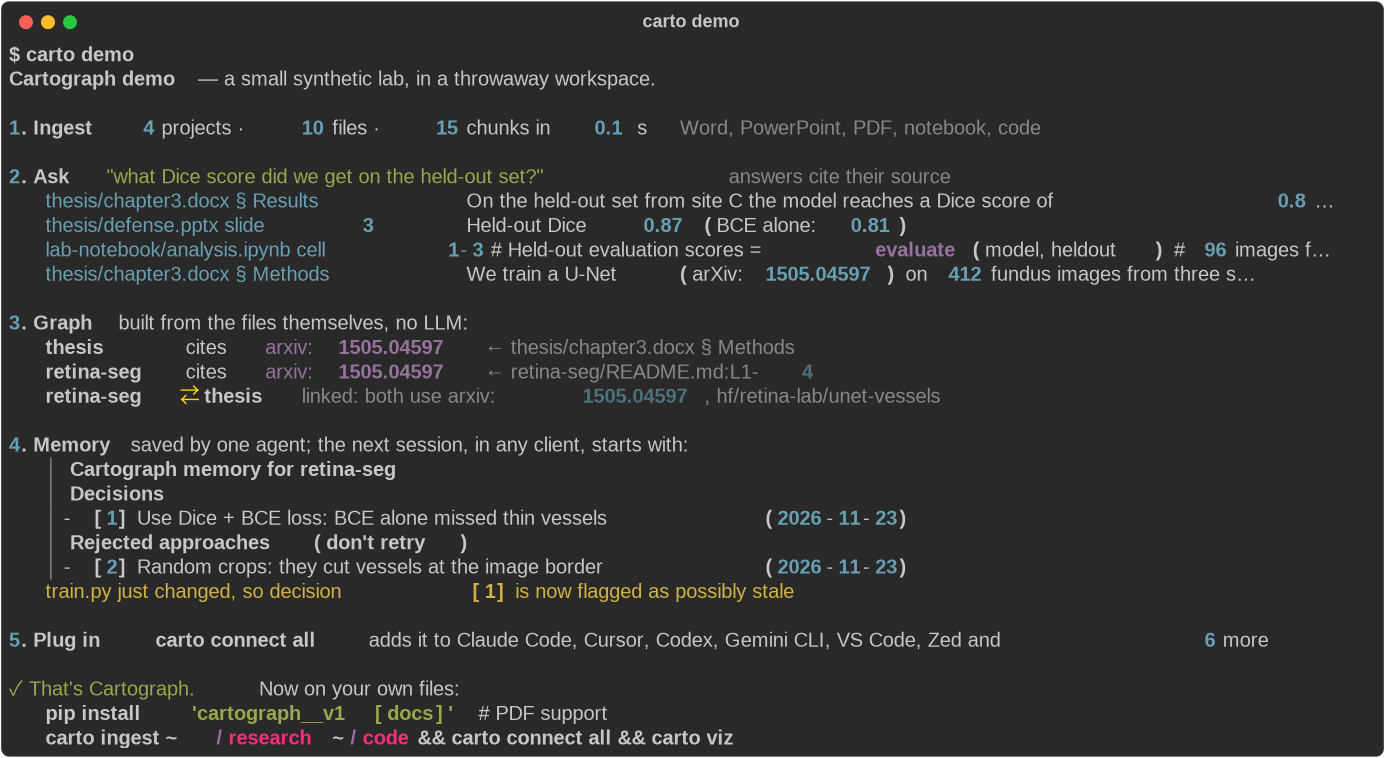
That's carto demo: a synthetic lab, start to finish, in under a second. Try it right after installing.
Why Cartograph
- Cited, not guessed. In our benchmark the top result cites the exact page, slide or line 99.2% of
the time, so your agent can quote
paper.pdf p.12and you can check it. - All your files, not just code. PDF, Word, PowerPoint, Excel, EPUB, notebooks, LaTeX, BibTeX and 70 code, data and config formats. Run daily on a 535,000-file, 6.5-million-chunk library.
- One memory for every agent. A decision saved in Claude Code is there in Cursor's next session. When the files a memory points at change, it's flagged as possibly stale.
- Local and light. One SQLite file, a 43 MB install, no LLM calls to index, no server, no account.
- Plugs into 12 AI clients with one command:
carto connect all.
Why not CLAUDE.md, built-in memory, or grep?
- CLAUDE.md, AGENTS.md and Claude's auto memory are great for instructions and a few dozen notes, for one repo in one client. Cartograph is for what doesn't fit there: thousands of PDFs and Office files across many projects, searched with citations, and shared by every client. Use both.
- grep can't read PDFs, Word or slides, doesn't rank, and has no budget. Across hundreds of thousands
of files an agent spends its context just finding one thing.
retrieve_contextreturns ranked, cited passages under a hardmax_tokenscap. Keyword search answers in 30 to 230 ms on a 6.5-million-chunk library. - Do I need a GPU, an API key or Docker? No. Keyword search works the moment
carto ingestfinishes. Semantic search is optional and runs locally.
 | Meet Moley, Your Local Guide. Named for the mole in The Wind in the Willows who catches the scent of a home he'd forgotten and finds his way back to it, he carries a brass lantern through your files so your agents don't have to dig, and it only lights up what there's evidence for. Local, because he never leaves your machine. |
Quickstart
pip install "cartograph__v1[docs]"     # core + PDF support. Command: carto. Import: cartograph
carto demo                             # one second, on a synthetic lab; your files untouched
carto ingest ~/research ~/code         # incremental: re-run anytime, only changed files are re-read
carto connect all                      # register the MCP server with every AI client it finds
carto viz                              # the Atlas: explore the map, search with citations
Add meaning-based search when you want it (uses your GPU if there is one):
pip install "cartograph__v1[semantic]" && carto index # resumable; searchable while it builds
Then ask your agent anything about your work. It calls retrieve_context and gets passages with
citations, the relevant graph facts and your memories, under the token budget you set.
What you get
| Documents with citations | PDF (pypdf or PyMuPDF, optional OCR), DOCX, PPTX, XLSX, EPUB, HTML, Jupyter, Markdown, LaTeX, BibTeX and 70 code, data and config formats. Chunks never cross page or slide boundaries. |
| A graph with provenance | Dependencies from manifests, imports, papers (DOI and arXiv), GitHub repos and Hugging Face models and datasets. Each fact has evidence (a citable chunk), confidence, the extractor that found it, and first and last seen dates. Projects are linked by what they share, weighted by rarity, and each link lists the shared entities. |
| Temporal memory | remember, recall, supersede and brief. Nothing is overwritten: validity intervals keep the history. You get conflict hints when a new memory contradicts an old one, and staleness flags when anchored files change. Files on an unplugged drive show as unavailable, not deleted. |
| Automatic session capture | carto hooks install for Claude Code, Cursor, Gemini CLI and Codex. Session start injects the project brief. Session end saves the goal, files touched and commands run. Saying decision: … or rejected: … in chat becomes a memory. |
| Hybrid retrieval with hard budgets | Reciprocal-rank fusion of BM25 and embeddings. Modes: mix, chunks, projects, graph, memory. max_tokens is a guarantee, not a hint. |
| Scales to millions of chunks | A pure-NumPy IVF-PQ index: 7 ms p50 at 6.5M chunks instead of 8–10 s brute force, with no FAISS and no OpenMP conflicts. Index builds resume after a crash, and you can search while they run. |
| Honest MCP | Real JSON Schemas, readOnlyHint and destructiveHint annotations, isError results. --read-only hides every tool that writes. |
| The Atlas | An offline, interactive map of your graph: headlamp exploration, cited search, project panels with evidence, and a memory timeline. |
Works with
carto connect writes the right config for each client. It backs up the file first and never
rewrites a file that contains comments:
| Client | Client | ||
|---|---|---|---|
| Claude Code | carto connect claude-code | Gemini CLI | carto connect gemini |
| Claude Desktop | carto connect claude-desktop | OpenAI Codex | carto connect codex |
| Cursor | carto connect cursor | Zed | carto connect zed |
| Windsurf | carto connect windsurf | Continue | carto connect continue |
| VS Code (Copilot agent mode) | carto connect vscode | LM Studio | carto connect lm-studio |
| Cline | carto connect cline | Goose | carto connect goose --print |
Any other MCP client: carto connect cursor --print shows the JSON to paste. ChatGPT and Gemini on
the web: carto serve plus the userscript in docs/BROWSER.md.
Runs on macOS, Linux and Windows with Python 3.10+; CI tests all three operating systems.
MCP tools
| Tool | Writes? | What the agent gets |
|---|---|---|
retrieve_context | no | cited passages, or mode: mix for memories + facts + passages under max_tokens |
brief | no | session-start digest for the project at cwd: decisions, rejected approaches, todos, recent sessions |
recall | no | memories by query, project or kind; history: true includes superseded ones |
entities | no | what a project depends on, imports, cites; or which projects mention an entity — with evidence |
relevant_projects | no | your projects that relate to a task |
personalize | no | a steering brief from your field and feedback |
elevate_task, frontier_status, frontier_hints | no | top-of-field reference repos and playbooks |
graph_stats | no | sizes of the graph, entities and memory |
remember, supersede | yes | save a decision, preference, fact or todo, or replace one |
record_use | yes | report what helped, so ranking adapts |
Benchmarks
Everything below is reproducible with carto bench. It runs in a throwaway home and never
touches your graph.
| Suite | Mode | Quality | Latency p50 / p95 |
|---|---|---|---|
| BEIR SciFact (300 queries, 5,183 abstracts) | keyword | nDCG@10 0.655 · R@100 0.873 · MRR@10 0.622 | 23 / 41 ms |
| BEIR SciFact | hybrid (nomic-embed v1.5) | nDCG@10 0.709 · R@100 0.938 · MRR@10 0.673 | 70 / 135 ms |
| Citations (240 planted facts in PDF, DOCX, PPTX, MD and PY) | keyword | exact citation@1 0.992 · hit@5 1.000 | 3 / 7 ms |
For reference, BEIR reports BM25 at 0.665 nDCG@10 on SciFact. The citation suite checks that the top result is the right file and that its citation points at the right page, slide or line. That's what you need before you trust an answer, and most RAG benchmarks don't measure it.
At scale, on a real 6.5M-chunk, 535k-file graph on an M-series Mac: approximate semantic search takes 7 ms p50 / 11 ms p95 (brute force: 8–10 s) with tie-aware recall@10 of 0.99. Extracting entities from all 6.5M chunks takes about 15 minutes.
How it compares
All of these projects are good, and several inspired parts of Cartograph. They make different trade-offs. This summary is based on each project's own docs at the time of writing; corrections welcome.
| Graph built without an LLM | Runs with no servers | Main focus | |
|---|---|---|---|
| Cartograph | yes | yes (one SQLite file) | your files plus agent memory, with citations |
| Claude Code auto memory | n/a (notes, no graph) | yes (Markdown files) | notes Claude keeps per repo, in Claude Code |
| Mem0 / OpenMemory | no (LLM extracts memories) | optional | chat and agent memory |
| Graphiti (Zep) | no | no (Neo4j or FalkorDB) | temporal knowledge graph of conversations |
| Cognee | no | yes (embedded defaults) | LLM-built knowledge graphs from data |
| LightRAG | no | yes | graph plus vector RAG |
| Microsoft GraphRAG | no (LLM-heavy indexing) | yes | community summaries over a corpus |
| RAGFlow | partly (parsing is not LLM-based) | no (Docker stack) | deep document understanding |
| Khoj | yes for search; chat needs an LLM | self-hosted server | personal AI assistant |
| Claude Context | yes | no (Milvus or Zilliz + embedding API) | semantic code search over MCP |
Pick Cartograph when you want your agents grounded in your documents and decisions, locally, with citations, at zero indexing cost. Pick an LLM-extraction system when you need open-ended relation extraction from prose and can pay for it.
Use cases
- Research. Search a library of papers and lab notes; answers cite
paper.pdf p.7. Projects sharing an arXiv paper or dataset are linked automatically. Agents remember which protocol you settled on. - Software. Your repos, their dependencies and imports, and your past decisions: "we rejected
Redis for this, see the session from March".
briefgreets every new agent session with the project's state. - Data science. Notebooks are indexed by cell (
analysis.ipynb cell 4-6), and spreadsheets by sheet. Hugging Face models and datasets become graph entities. - Law, policy and consulting. Long Word and PDF documents with section and page citations you can paste into a memo.
- Students and teaching. Lecture slides (
slide 12), readings and assignments in one searchable map; works offline. - Finance and operations. Workbooks are searchable by sheet and the reports by page, all on your own machine.
It works the same across fields because nothing is tuned to one domain. Field labels are learned from
your folders (carto fields), and the graph is built from file structure, not from a prompt.
The Atlas
carto viz
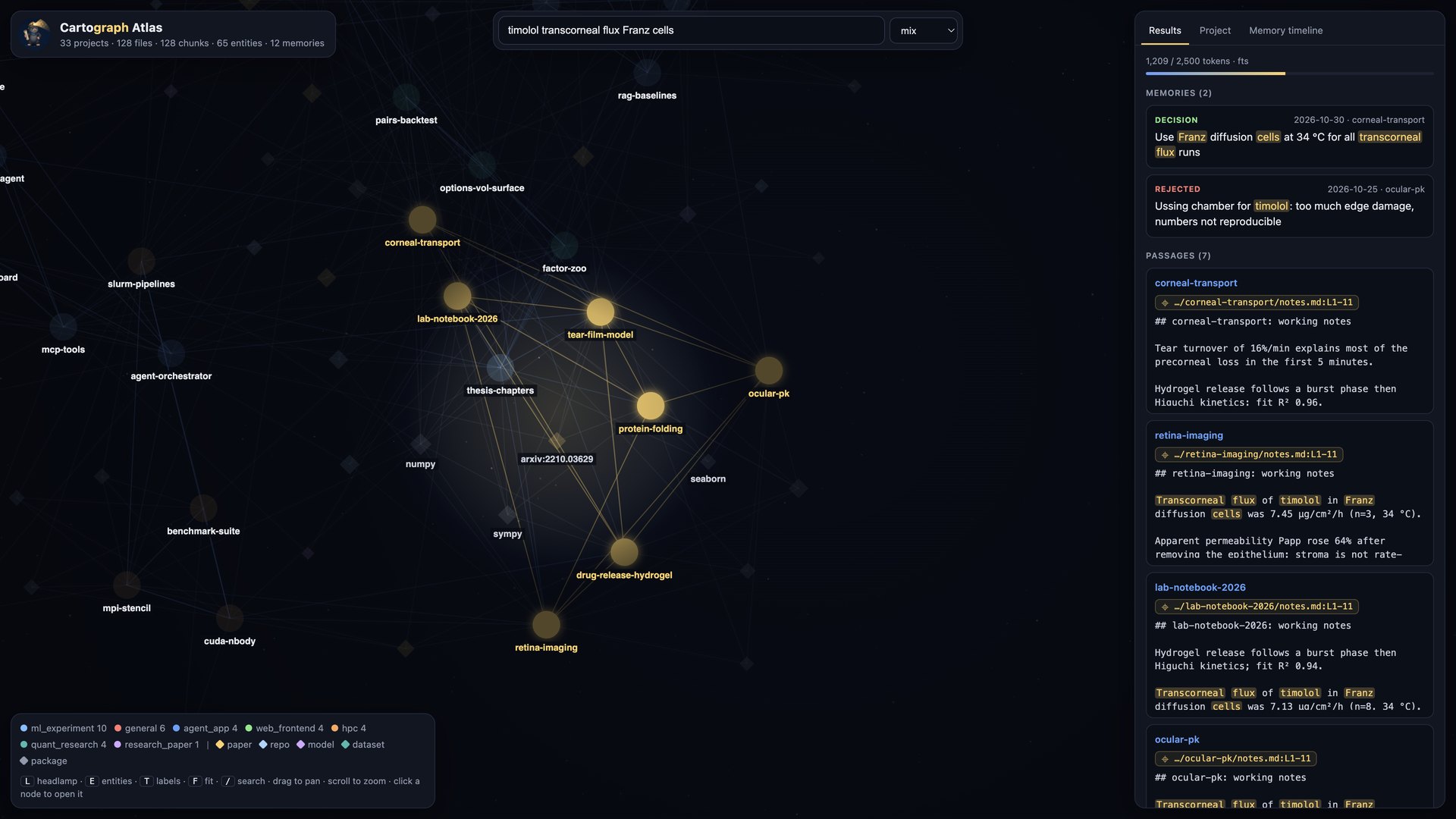
An interactive map of your graph that works offline: no CDN, no tracking.
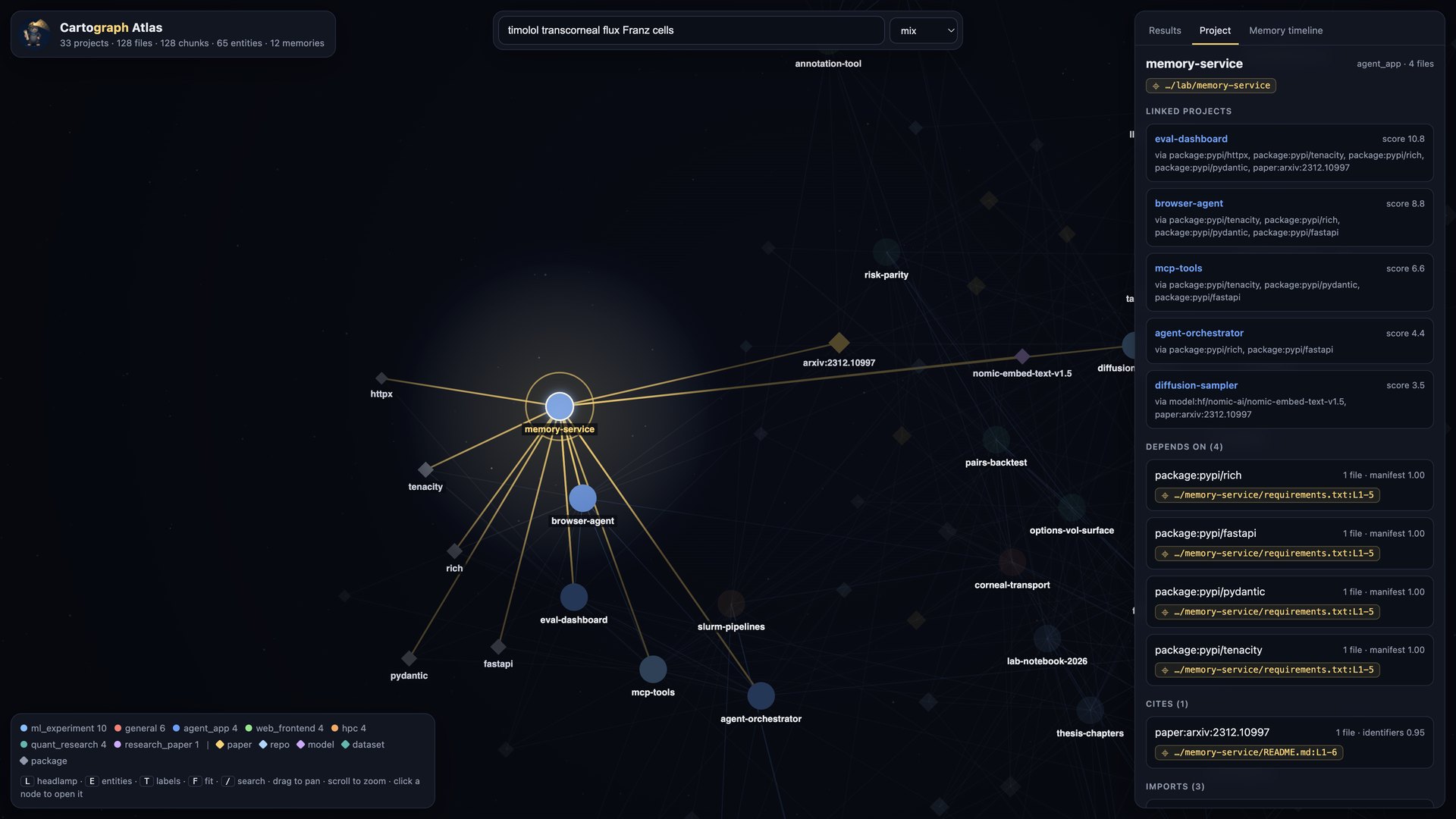 | 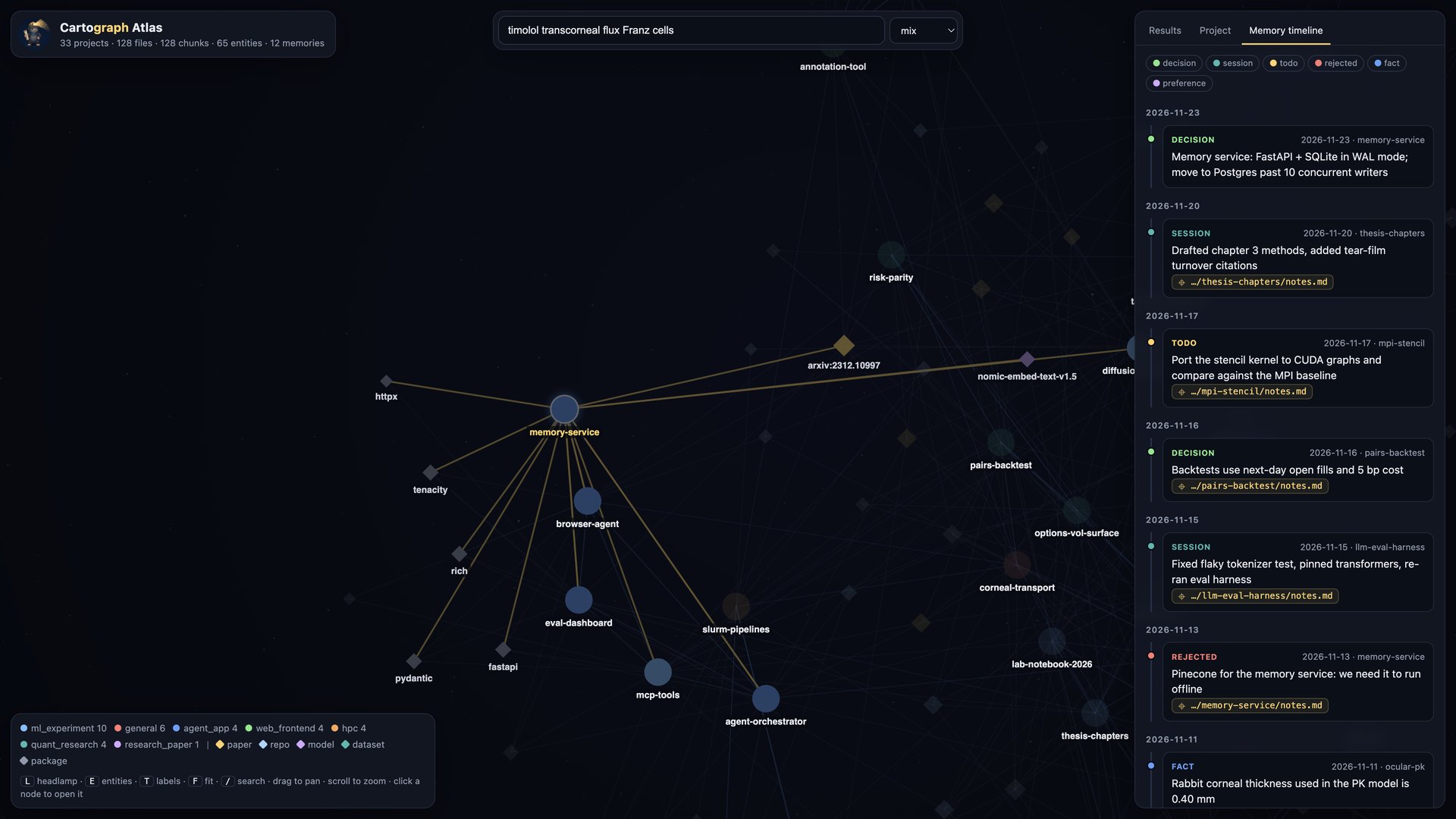 |
Screenshots use a synthetic lab (python scripts/atlas_showcase.py), not anyone's real files.
- Headlamp (
L): the map stays dark and lights up where you point. Labels appear under the lamp. - Search (
/): matching projects glow and pulse. Results show memories, graph facts and passages, each with a citation chip; click it to copypath:L12-48. - Project panel: click a node to see its dependencies, citations and references with evidence, linked projects and the entities that link them, and its memories.
- Memory timeline: every decision, rejection and session in order. Superseded entries are struck through.
- Entity hubs (papers, repos, models, datasets shared by several projects) show as diamonds (
Etoggles them).
Robustness
- Incremental and exact. Files are hashed in full. Unchanged files are skipped by size and mtime without being read, and older graphs migrate in place.
- Crash-safe indexing. A killed
carto indexresumes from the rows already written.carto index --backgrounddetaches it, andcarto index --status --watchshows progress. - External drives. Files on an unmounted drive are reported as unavailable rather than deleted, so memory anchors and citations survive a missing USB disk.
- Bad files. An unreadable PDF or a corrupt DOCX is skipped without stopping the ingest.
- Safe config edits.
connectandhooksback up every file they touch, are idempotent, and can be undone (--remove,hooks uninstall).
Limits
- The graph is built from structure, not from an LLM reading your prose: dependencies, imports, papers (DOI, arXiv), repos, models, datasets and the links they imply. If you need open-ended relations extracted from text, an LLM-built graph (GraphRAG, Graphiti, Cognee) does that, at a cost.
- Scanned PDFs need OCR: install PyMuPDF and Tesseract and set
ocr: true. - Embedding millions of chunks takes hours on a laptop. Keyword search works immediately, and you can search while the semantic index builds.
- It's a context layer, not a chat app. Bring your own agent or model.
Install options
| Install | Adds |
|---|---|
pip install cartograph__v1 | graph, keyword search, Office, EPUB and HTML, memory, MCP, Atlas. A small install with no ML. |
[docs] | PDF text with page citations (pypdf; PyMuPDF is used if present, plus OCR with ocr: true) |
[semantic] | embeddings and hybrid search (sentence-transformers; CUDA or Apple GPU if available) |
[ml], [vision], [secure] | train models on your graph, screen capture to OCR, at-rest encryption |
[full] | everything |
Put the graph on a roomy drive with CARTOGRAPH_HOME=/path. See docs/SCALING.md
and docs/ARCHITECTURE.md.
Commands
ingest · index · retrieve · entities · memory add|recall|supersede|forget|brief · hooks install|status
connect · viz · studio · serve · bench · stats · doctor · mcp-server · demo · init · improve · eval
Run carto <command> --help for details. Changes are in CHANGELOG.md.
Privacy
Everything lives in ~/.cartograph (or CARTOGRAPH_HOME). Your files are never uploaded, and there is
no telemetry. The network is used only when you ask for it: downloading the embedding model for
[semantic], downloading SciFact for carto bench, and carto scout (also run by carto improve),
which sends topic keywords, never file contents, to the arXiv and GitHub search APIs.
The local web server binds to loopback, checks the Host header against DNS rebinding, and requires a
token for anything that writes.
License
MIT. See LICENSE.
cartograph__v1pip install cartograph__v1